Friday, December 30, 2011

iOS icon file resolution
Description | Size for iPhone and iPod touch (in pixels) | Size for iPad (in pixels) | Guidelines |
|---|---|---|---|
Application icon (required for all apps) | 57 x 57 114 x 114 (high resolution) | 72 x 72 | |
App Store icon (required for all apps) | 512 x 512 | 512 x 512 | |
Launch image (required for all apps) | 320 x 480 640 x 960 (high resolution) | For portrait:
For landscape:
| |
Small icon for Spotlight search results and Settings (recommended) | 29 x 29 58 x 58 (high resolution) | 50 x 50 for Spotlight search results 29 x 29 for Settings | |
Document icon (recommended for custom document types) | 22 x 29 44 x 58 (high resolution) | 64 x 64 320 x 320 | |
Web clip icon (recommended for web apps and websites) | 57 x 57 114 x 114 (high resolution) | 72 x 72 | |
Toolbar and navigation bar icon (optional) | Approximately 20 x 20 Approximately 40 x 40 (high resolution) | Approximately 20 x 20 | |
Tab bar icon (optional) | Approximately 30 x 30 Approximately 60 x 60 (high resolution) | Approximately 30 x 30 | |
Newsstand icon for the App Store (required for Newsstand apps) | At least 512 pixels on the longest edge | At least 512 pixels on the longest edge |
http://developer.apple.com/library/ios/#documentation/userexperience/conceptual/mobilehig/IconsImages/IconsImages.html
Thursday, December 29, 2011
Wednesday, December 28, 2011
Add multiple column in UITableViewControl for iOS
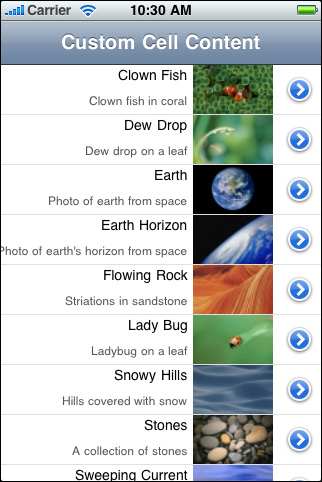
#define MAINLABEL_TAG 1 |
#define SECONDLABEL_TAG 2 |
#define PHOTO_TAG 3 |
- (UITableViewCell *)tableView:(UITableView *)tableView cellForRowAtIndexPath:(NSIndexPath *)indexPath { |
static NSString *CellIdentifier = @"ImageOnRightCell"; |
UILabel *mainLabel, *secondLabel; |
UIImageView *photo; |
UITableViewCell *cell = [tableView dequeueReusableCellWithIdentifier:CellIdentifier]; |
if (cell == nil) { |
cell = [[[UITableViewCell alloc] initWithStyle:UITableViewCellStyleDefault reuseIdentifier:CellIdentifier] autorelease]; |
cell.accessoryType = UITableViewCellAccessoryDetailDisclosureButton; |
mainLabel = [[[UILabel alloc] initWithFrame:CGRectMake(0.0, 0.0, 220.0, 15.0)] autorelease]; |
mainLabel.tag = MAINLABEL_TAG; |
mainLabel.font = [UIFont systemFontOfSize:14.0]; |
mainLabel.textAlignment = UITextAlignmentRight; |
mainLabel.textColor = [UIColor blackColor]; |
mainLabel.autoresizingMask = UIViewAutoresizingFlexibleLeftMargin | UIViewAutoresizingFlexibleHeight; |
[cell.contentView addSubview:mainLabel]; |
secondLabel = [[[UILabel alloc] initWithFrame:CGRectMake(0.0, 20.0, 220.0, 25.0)] autorelease]; |
secondLabel.tag = SECONDLABEL_TAG; |
secondLabel.font = [UIFont systemFontOfSize:12.0]; |
secondLabel.textAlignment = UITextAlignmentRight; |
secondLabel.textColor = [UIColor darkGrayColor]; |
secondLabel.autoresizingMask = UIViewAutoresizingFlexibleLeftMargin | UIViewAutoresizingFlexibleHeight; |
[cell.contentView addSubview:secondLabel]; |
photo = [[[UIImageView alloc] initWithFrame:CGRectMake(225.0, 0.0, 80.0, 45.0)] autorelease]; |
photo.tag = PHOTO_TAG; |
photo.autoresizingMask = UIViewAutoresizingFlexibleLeftMargin | UIViewAutoresizingFlexibleHeight; |
[cell.contentView addSubview:photo]; |
} else { |
mainLabel = (UILabel *)[cell.contentView viewWithTag:MAINLABEL_TAG]; |
secondLabel = (UILabel *)[cell.contentView viewWithTag:SECONDLABEL_TAG]; |
photo = (UIImageView *)[cell.contentView viewWithTag:PHOTO_TAG]; |
} |
NSDictionary *aDict = [self.list objectAtIndex:indexPath.row]; |
mainLabel.text = [aDict objectForKey:@"mainTitleKey"]; |
secondLabel.text = [aDict objectForKey:@"secondaryTitleKey"]; |
NSString *imagePath = [[NSBundle mainBundle] pathForResource:[aDict objectForKey:@"imageKey"] ofType:@"png"]; |
UIImage *theImage = [UIImage imageWithContentsOfFile:imagePath]; |
photo.image = theImage; |
return cell; |
} |
Sunday, June 22, 2008
WPF and UI design tutorials
1. http://www.creativeui.com/2007/05/16/30-wpf-and-silverlight-resources/
http://blogs.msdn.com/coding4fun/archive/2006/11/06/999502.aspx
2. Editing Data with the Data Access Application Block (http://www.dotnetjunkies.com/Tutorial/E4D85B81-FF32-4F86-A663-1AA36E794E4C.dcik)
Video tutorials for UI design
1. http://movielibrary.lynda.com/html/modPage.asp?ID=359
Thursday, April 3, 2008
JScript: list all processes
var colItems = objWMIService.ExecQuery("SELECT * FROM Win32_Process");
var enumItems = new Enumerator(colItems);
for (; !enumItems.atEnd(); enumItems.moveNext()) {
var objItem = enumItems.item();
WScript.Echo("Caption: " + objItem.Caption);
WScript.Echo("Command Line: " + objItem.CommandLine);
WScript.Echo("Creation Class Name: " + objItem.CreationClassName);
WScript.Echo("Creation Date: " + objItem.CreationDate);
WScript.Echo("CS Creation Class Name: " + objItem.CSCreationClassName);
WScript.Echo("CS Name: " + objItem.CSName);
WScript.Echo("Description: " + objItem.Description);
WScript.Echo("Executable Path: " + objItem.ExecutablePath);
WScript.Echo("Execution State: " + objItem.ExecutionState);
WScript.Echo("Handle: " + objItem.Handle);
WScript.Echo("Handle Count: " + objItem.HandleCount);
WScript.Echo("Install Date: " + objItem.InstallDate);
WScript.Echo("Kernel Mode Time: " + objItem.KernelModeTime);
WScript.Echo("Maximum Working Set Size: " + objItem.MaximumWorkingSetSize);
WScript.Echo("Minimum Working Set Size: " + objItem.MinimumWorkingSetSize);
WScript.Echo("Name: " + objItem.Name);
WScript.Echo("OS Creation Class Name: " + objItem.OSCreationClassName);
WScript.Echo("OS Name: " + objItem.OSName);
WScript.Echo("Other Operation Count: " + objItem.OtherOperationCount);
WScript.Echo("Other Transfer Count: " + objItem.OtherTransferCount);
WScript.Echo("Page Faults: " + objItem.PageFaults);
WScript.Echo("Page File Usage: " + objItem.PageFileUsage);
WScript.Echo("Parent Process Id: " + objItem.ParentProcessId);
WScript.Echo("Peak Page File Usage: " + objItem.PeakPageFileUsage);
WScript.Echo("Peak Virtual Size: " + objItem.PeakVirtualSize);
WScript.Echo("Peak Working Set Size: " + objItem.PeakWorkingSetSize);
WScript.Echo("Priority: " + objItem.Priority);
WScript.Echo("Private Page Count: " + objItem.PrivatePageCount);
WScript.Echo("Process Id: " + objItem.ProcessId);
WScript.Echo("Quota NonPaged Pool Usage: " + objItem.QuotaNonPagedPoolUsage);
WScript.Echo("Quota Paged Pool Usage: " + objItem.QuotaPagedPoolUsage);
WScript.Echo("Quota Peak NonPaged Pool Usage: " + objItem.QuotaPeakNonPagedPoolUsage);
WScript.Echo("Quota Peak Paged Pool Usage: " + objItem.QuotaPeakPagedPoolUsage);
WScript.Echo("Read Operation Count: " + objItem.ReadOperationCount);
WScript.Echo("Read Transfer Count: " + objItem.ReadTransferCount);
WScript.Echo("Session Id: " + objItem.SessionId);
WScript.Echo("Status: " + objItem.Status);
WScript.Echo("Termination Date: " + objItem.TerminationDate);
WScript.Echo("Thread Count: " + objItem.ThreadCount);
WScript.Echo("User Mode Time: " + objItem.UserModeTime);
WScript.Echo("Virtual Size: " + objItem.VirtualSize);
WScript.Echo("Windows Version: " + objItem.WindowsVersion);
WScript.Echo("Working Set Size: " + objItem.WorkingSetSize);
WScript.Echo("Write Operation Count: " + objItem.WriteOperationCount);
WScript.Echo("Write Transfer Count: " + objItem.WriteTransferCount);
WScript.Echo();
}
Friday, February 15, 2008
JScript: collecting the output after run command
var exec = shell.Exec("ipconfig /all");
WScript.StdOut.Write(exec.StdOut.ReadAll());
From http://snippets.dzone.com/posts/show/627