Sunday, January 8, 2012

Basic R - Loading Data

Here is the steps to loading data into R.

Get Zip data from http://www-stat.stanford.edu/~tibs/ElemStatLearn/ Data -> Zip

  • getwd() - to get current directory
  • setwd("path") - to set current directory

Load Data
  • read.table
  • read.csv
help(read.table) / ?read.table


setwd("c:\\data")
zipTraining = read.table("zip.train")

summary(zipTraining)
head(a)
dim(zipTraining)
str(zipTraining)


Format data
zipTest<-read.table("zip.test")
zipTraining<-read.table("zip.train")

zipTrainData<-as.matrix(zipTraining[,2:257])
zipTrainLable<-as.factor(zipTraining[,1])

zipTestData<-as.matrix(zipTest[,2:257])
zipTestLable<-as.factor(zipTest[,1])

Learning
zip.lm <- lm(zipTrain~zipLable)

Monday, January 2, 2012

ETW events

http://blogs.msdn.com/b/ntdebugging/archive/2009/08/27/etw-introduction-and-overview.aspx

Improve Debugging And Performance Tuning With ETW

Friday, December 30, 2011

Generating iPhone app icon

http://www.iconj.com/iphone_style_icon_generator.php

iOS icon file resolution

Description

Size for iPhone and iPod touch (in pixels)

Size for iPad (in pixels)

Guidelines

Application icon (required for all apps)

57 x 57

114 x 114 (high resolution)

72 x 72

“Application Icons”

App Store icon (required for all apps)

512 x 512

512 x 512

“Application Icons”

Launch image (required for all apps)

320 x 480

640 x 960 (high resolution)

For portrait:

  • 768 x 1004

For landscape:

  • 1024 x 748

“Launch Images”

Small icon for Spotlight search results and Settings (recommended)

29 x 29

58 x 58 (high resolution)

50 x 50 for Spotlight search results

29 x 29 for Settings

“Small Icons”

Document icon (recommended for custom document types)

22 x 29

44 x 58 (high resolution)

64 x 64

320 x 320

“Document Icons”

Web clip icon (recommended for web apps and websites)

57 x 57

114 x 114 (high resolution)

72 x 72

“Web Clip Icons”

Toolbar and navigation bar icon (optional)

Approximately 20 x 20

Approximately 40 x 40 (high resolution)

Approximately 20 x 20

“Icons for Navigation Bars, Toolbars, and Tab Bars”

Tab bar icon (optional)

Approximately 30 x 30

Approximately 60 x 60 (high resolution)

Approximately 30 x 30

“Icons for Navigation Bars, Toolbars, and Tab Bars”

Newsstand icon for the App Store (required for Newsstand apps)

At least 512 pixels on the longest edge

At least 512 pixels on the longest edge

“Newsstand Icons”


http://developer.apple.com/library/ios/#documentation/userexperience/conceptual/mobilehig/IconsImages/IconsImages.html

Thursday, December 29, 2011

iPhone data formatter

http://iphonedevelopertips.com/cocoa/date-formatter-examples.html

Wednesday, December 28, 2011

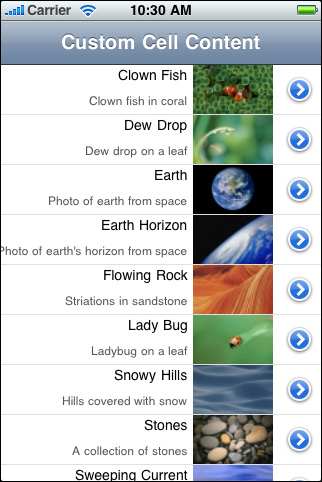
Add multiple column in UITableViewControl for iOS


#define MAINLABEL_TAG 1
#define SECONDLABEL_TAG 2
#define PHOTO_TAG 3
 
- (UITableViewCell *)tableView:(UITableView *)tableView cellForRowAtIndexPath:(NSIndexPath *)indexPath {
 
    static NSString *CellIdentifier = @"ImageOnRightCell";
 
    UILabel *mainLabel, *secondLabel;
    UIImageView *photo;
    UITableViewCell *cell = [tableView dequeueReusableCellWithIdentifier:CellIdentifier];
    if (cell == nil) {
        cell = [[[UITableViewCell alloc] initWithStyle:UITableViewCellStyleDefault reuseIdentifier:CellIdentifier] autorelease];
        cell.accessoryType = UITableViewCellAccessoryDetailDisclosureButton;
 
        mainLabel = [[[UILabel alloc] initWithFrame:CGRectMake(0.0, 0.0, 220.0, 15.0)] autorelease];
        mainLabel.tag = MAINLABEL_TAG;
        mainLabel.font = [UIFont systemFontOfSize:14.0];
        mainLabel.textAlignment = UITextAlignmentRight;
        mainLabel.textColor = [UIColor blackColor];
        mainLabel.autoresizingMask = UIViewAutoresizingFlexibleLeftMargin | UIViewAutoresizingFlexibleHeight;
        [cell.contentView addSubview:mainLabel];
 
        secondLabel = [[[UILabel alloc] initWithFrame:CGRectMake(0.0, 20.0, 220.0, 25.0)] autorelease];
        secondLabel.tag = SECONDLABEL_TAG;
        secondLabel.font = [UIFont systemFontOfSize:12.0];
        secondLabel.textAlignment = UITextAlignmentRight;
        secondLabel.textColor = [UIColor darkGrayColor];
        secondLabel.autoresizingMask = UIViewAutoresizingFlexibleLeftMargin | UIViewAutoresizingFlexibleHeight;
        [cell.contentView addSubview:secondLabel];
 
        photo = [[[UIImageView alloc] initWithFrame:CGRectMake(225.0, 0.0, 80.0, 45.0)] autorelease];
        photo.tag = PHOTO_TAG;
        photo.autoresizingMask = UIViewAutoresizingFlexibleLeftMargin | UIViewAutoresizingFlexibleHeight;
        [cell.contentView addSubview:photo];
    } else {
        mainLabel = (UILabel *)[cell.contentView viewWithTag:MAINLABEL_TAG];
        secondLabel = (UILabel *)[cell.contentView viewWithTag:SECONDLABEL_TAG];
        photo = (UIImageView *)[cell.contentView viewWithTag:PHOTO_TAG];
    }
    NSDictionary *aDict = [self.list objectAtIndex:indexPath.row];
    mainLabel.text = [aDict objectForKey:@"mainTitleKey"];
    secondLabel.text = [aDict objectForKey:@"secondaryTitleKey"];
    NSString *imagePath = [[NSBundle mainBundle] pathForResource:[aDict objectForKey:@"imageKey"] ofType:@"png"];
    UIImage *theImage = [UIImage imageWithContentsOfFile:imagePath];
    photo.image = theImage;
 
    return cell;
}

Copy from: http://developer.apple.com/library/ios/#documentation/UserExperience/Conceptual/TableView_iPhone/TableViewCells/TableViewCells.html%23//apple_ref/doc/uid/TP40007451-CH7

Sunday, June 22, 2008

WPF and UI design tutorials

Here is the WPF tutorials

1. http://www.creativeui.com/2007/05/16/30-wpf-and-silverlight-resources/

http://blogs.msdn.com/coding4fun/archive/2006/11/06/999502.aspx

2. Editing Data with the Data Access Application Block (http://www.dotnetjunkies.com/Tutorial/E4D85B81-FF32-4F86-A663-1AA36E794E4C.dcik)

Video tutorials for UI design

1. http://movielibrary.lynda.com/html/modPage.asp?ID=359